Und dann auf "Zum Home-Bildschirm [+]".

Stöbern
genialokal zum Startbildschirm hinzufügen
Installieren Sie die genialokal App auf Ihrem Startbildschirm für einen schnellen Zugriff und eine komfortable Nutzung.
Installieren Sie die genialokal App auf Ihrem Startbildschirm für einen schnellen Zugriff und eine komfortable Nutzung.
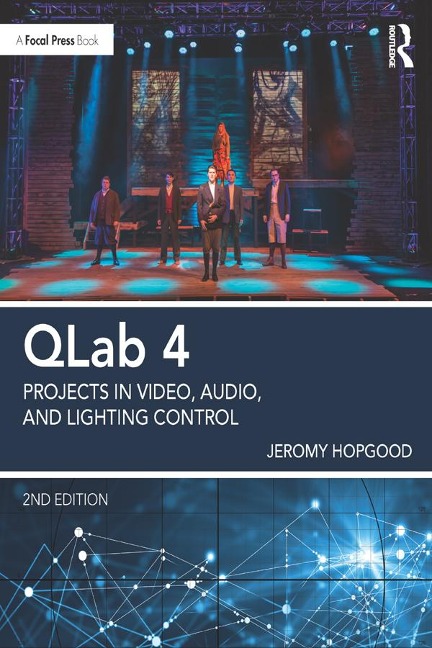
Used from Broadway to Britain's West End, QLab software is the tool of choice for many of the world's most prominent sound, projection, and integrated media designers. QLab 4: Projects in Video, Audio, and Lighting Control is a project-based book on QLab software covering sound, video, lighting, and show control. With information on audio, video, and lighting system basics and the more advanced functions of QLab such as show control, network capabilities, projection mapping, video effects, and cue cart integration, each chapter's specific projects will allow you to learn the software's capabilities at your own pace. In addition to the text, a companion website hosts project files, instructional videos, and more.
Jeromy Hopgood is a Professor of Entertainment Design & Technology at Eastern Michigan University. In addition to his teaching, Jeromy has designed more than 150 plays, musicals, dance and opera productions over the last decade. His work in scenery, lighting, projections and sound has been showcased at professional theatres across the Southeast and Midwest United States. He worked at the Williamstown Theatre Festival in its Tony-Award-Winning season and is an artistic associate at the Michigan Shakespeare Festival, where he is the resident scenic designer and technical director. Professor Hopgood is a long-standing member of the United States Institute of Theatre Technology. In addition to presenting panels on projection design, media, and educational theatre at numerous USITT annual conferences, he is also a regular presenter at Live Design International.
Foreword Acknowledgements Preface PART I: QLab Basics Chapter 1. What's new in Version 4 - Workflow Changes Cue Templates Record Cue Sequence Paste Cue Properties Batch Editing - New Playback Options Cue Triggers Negative Post-Wait New Fade Curve Shape and Audio Domain - Integrated Lighting Control - Cue Carts - Audio Improvements 64-channel output Mic Cues Precision Slice Control - Video Improvements HAP codec cupport Copy/Paste Surface Geometry Set durations for Still Images and Text Cues - QLab Remote Brand new design Adjust video surface control points Access to Light Levels in Inspector Cart Integration Create and reorder cues - Summary Chapter 2. Getting to Know QLab 4 2.1 QLab 4 System Recommendations RAM Processor (CPU) GPU Hard Drive 2.2 Understanding QLab 4 Licensing How do licenses work? The Free Version Professional Licenses Rent-to-Own Academic Licensing Site Licenses Using QLab 3 2.3 Installing the Software 2.4 Adding a License Removing Licenses Modernizing you QLab 3 Licenses 2.5 Organization and Workflow 2.6 Templates 2.7 Workspace Settings A. General Cue Triggering Go button settings Panic duration Cue numbering & Auto-load Lock playhead Cue Row Sizing B. Audio C. Video D. Light E. Network F. MIDI G. Cue Templates H. Key Map I. MIDI & OSC Controls 2.8 QLab Preferences At Launch Updates Send Aggregate Usage Data Disabling OS Features Audio Device Buffering Broadcast Mode Logging Level 2.9 Preparing your computer for running a show Design Tips: Using Terminal Internet Related Concerns Delete All Extraneous Software Disable Notifications Disable Screen Saver Disable Spotlight Disable Time Machine Video Concerns Design Tips: Backup Systems and Saving Protocol Chapter 3. Understanding the QLab Workspace 3.1 Understanding Cues and the Cue Structure What is a Cue? Design Tips: Using Time Display Modes How do Cues operate? Cue Lists Cue Sequences Playback Position 3.2 The Workspace A. Go/ Standby / Notes Field B. Toolbar C. The Main Cue List Design Tips: Toolbox and Load to Time D. The Inspector The Basics Tab The Triggers Tab Design Tips: Assigning a MIDI Trigger New Trigger Settings E. The Workspace Footer Edit / Show Mode Cue and Cue List Count Warnings Panel Cue Lists, Carts, and Active Cues Sidebar Status Window Settings 3.3 Adding Cues 3.4 Setting Targets for Cues 3.5 Navigation and Quick Keys Design Tips: Searching the Workspace 3.6 Paste Cue Properties 3.7 The Tools Menu Load to Time Renumber Selected Cues Delete Number of Selected Cues Jump to Cue Jump to Selected Cues' Target Record Cue Sequence Live Fade Preview Highlight Related Cues Black out and Restore Desktop Backgrounds A. Fade Tools Set Parameters from target Set audio levels from target Set video geometry from target Revert fade action 3.8 The Window Menu Audition Window Override Controls Lighting Controls (Light Dashboard, Light Patch, Light Library, DMX Status) Timecode Window 3.9 Cue Carts PART II: QLab Audio Control Chapter 4. QLab and Audio Basics 4.1 Audio Systems 4.2 Basic Audio Equipment & Terminology Microphone Input Source Mixing Console Signal Processors Amplifier Speaker 4.3 Understanding Basic Signal Flow: Input / Output 4.3 Understanding Software Signal Flow Audio File Audio Cue Inputs Crosspoints Levels Faders (Cue Outputs) Audio Patch Audio Device Output Routing 4.4 A Word About Audio Devices 4.5 Audio System Configurations Basic Stereo Playback with Multiple Speakers Multichannel Playback System with External Signal Processing Multichannel Playback System with QLab Signal Processing Design Tips: Redundant Systems Chapter 5. Setting up QLab with your Audio System 5.1 The Multichannel Sound System 5.2 Audio Settings Volume Limits Mic Settings 5.3 Cue Templates Audio Output Patch The Matrix Mixer Inputs Crosspoints Cue Outputs Setting Level Faders Master Fader Design Tips: Balancing Audio Output Default, Silent, & Gangs 5.4 Editing Audio Patches Audio Patch Editor: Cue Outputs Audio Patch Editor: Device Routing Crosspoints Audio Patch Editor: Device Outputs 5.4 Setting up QLab with an Audio Device 5.5 Customizing Your Audio Patches Project 5.1 - Setting up your System 5.6 Audio Device Volume Levels 5.7 Audio Effects and How to Use Them Audio Effects and Cue Outputs Project 5.2 - Creating a Reverb Send in QLab 5.8 Using Multichannel Audio Files Chapter 6. Audio Cues 6.1 Inserting an Audio Cue 6.2 Inspector: Basics 6.3 Inspector: Triggers Affecting Other Cues 6.4 Inspector: Time & Loops The Waveform Display Waveform Zoom Design Tips: Multi-Touch Gestures Preview Cue Times, Loops, and Slices Design Tips: Looping Sliced Tracks Integrated Volume Levels and Playback Rate Controlling Playback Rate Project 6.1 - Manipulating Start / End Times Project 6.2 - Adding Slices Project 6.3 - Manipulating Playback Rate 6.5 Inspector: Audio Levels Audio Output Patch & Device Edit Set Default Levels Set All Levels Silent Assign Gangs Visible Channels Audio Levels & Crosspoint Matrix 6.6 Inspector: Audio Trim 6.7 Inspector: Audio Effects Project 6.4 - Editing with Audio Effects Chapter 7. Mic Cues 7.1 Understanding the Mic Cue Signal Flow Buffering 7.2 Setting up Your Audio Device Design Tips: Getting to Know Your Equipment Mic Settings Mic Patch Device Routing 7.3 Inserting and Editing the Mic Cue Inspector: Basics Inspector: Triggers Inspector: Audio Levels Audio Input & Output Patch Visible Channels Default Levels Set All to Silent Assign Gangs Levels & Crosspoint Matrix Inspector: Audio Trim Inspector: Audio Effects 7.4 Audio Effects and Mic Cues Cue Output Project 7.1 - Creating a Global EQ Send with Cue Outputs Device Output Project 7.2 - Assigning an Audio Effect to a Device Output Chapter 8. Fade Cues 8.1 Inserting and Editing Audio Fade Cues Design Tips: Cue Naming 8.2 Inspector: Basics 8.3 Inspector: Triggers 8.4 Inspector: Curve Shape Audio Domains Fade Cue Duration Reset to Default Shape 8.5 Inspector: Audio Levels Fade Type: Absolute vs. Relative Stop Target When Done Design Tips: Fading Group Cues Levels and Crosspoint Matrix Set From Target / Set All Silent Assign Gangs Live Preview 8.6 Inspector: Audio Effects Fade Rate Stop Target When Done Set Audio Effects from Target Audio Fade Cue Summary Project 8.1 - Pitch Bend to Replicate a Reel-to-Reel Malfunction 8.7 Mic Fade Cues Inserting a Mic Fade Cue Basics, Triggers, & Curve Shape Audio Levels Audio Effects 8.8 Manual Fades Project 8.2 - Creating a Zero-Count Fade Cue 8.9 Automatic Fades Project 8.3 - Automated Fade-In and Fade-Out of an Audio Cue 8.10 Panning Project 8.4 - Panning via Fade Cue 8.11 Ducking Audio Project 8.5 - Ducking Audio 8.12 Copy/Paste Fade Parameters 8.13 Exploring Trim Chapter 9. Control Cues 9.1 Start, Stop, and Pause Cues Start Cue Stop Cue Pause Cue 9.2 Load Cue Design Tips: Load Cues and Playback Position 9.3 Reset Cue 9.4 Devamp Cue Project 9.1 - Vamping an Audio Cue with Loops Project 9.2 - Vamping an Audio Cue with Slices 9.5 GoTo and Target Cues GoTo Cue Target Cue 9.6 Arm and Disarm Cues 9.7 Wait Cue 9.8 Memo Cue 9.9 Script Cue Design Tips: Hotkey Safety Project 9.3 - Creating a Hotkey Activated Script Cue Chapter 10. Group Cues 10.1 Understanding Group Cues 10.2 Inserting and Editing Group Cues 10.3 Inspector: Basics 10.4 Inspector: Triggers 10.5 Inspector: Mode 10.6 Workspace Function Cue Name Notes Hiding Group Cue Contents 10.7 Group Cue Projects Project 10.1 - Using a Group Cue to Create a Playlist Project 10.2 - Simultaneous Playback of Children Chapter 11. Cue Carts 11.1 Understanding Cue Carts 11.2 Creating a Cue Cart 11.2 Inserting Cues into Carts 11.3 Cue Cart Setup: Inspector Basics Triggers Grid Size 11.4 How to Use Cue Carts 11.6 Integrating the QLab Remote PROJECT 11.1 - Using a Cue Cart for Flexible Playback Part III: QLab Video Control Chapter 12. QLab Video System Basics 12.1 Understanding Video Systems Video Playback Systems Video Reinforcement Systems 12.2 Video System Components 1. The Digital Video Camera 2. Computer 3. Interface Connections 4. Output Devices 12.3 Understanding Video Signal Flow Video / Image File / Video Feed Video Cue / Camera Cue Video Surface Patch Design Tips: Surface Control Output Device Audio 12.4 Hardware Considerations The Bottleneck Dilemma Data Path Hard Drive / Data Storage External Storage The Need for Multiple Drives RAM CPU QLab Video CPU Usage Regarding Codecs and Compression Video Card vRAM GPU Output 12.5 Connecting to a Video Display What Kind of Connector(s) are Needed? Cable runs Signal Amplifiers 12.6 Graphics Expansion Devices Chapter 13. Video System Preferences and Setup 13.1 Workspace settings: Video Surfaces Video Surfaces Adding Surfaces Duplicating Surfaces 13.2 Editing Surfaces Editing the Single-Screen Surface Surface Name and Dimensions Editor Canvas Screens Individual Screen Controls Surface Controls 13.3 Creating and Editing New Surfaces Tools of the Trade: Remote Control for Your Workspace 13.4 Setting up a Graphics Expansion Device with QLab Project 13.1 - Plug-and-Play Setup Project 13.2 - Individual Screen Control with an Expansion Module 13.5 Creating a Surface with Edge Blending Project 13.3 - Creating a Surface with Edge Blending 13.6 Workspace Settings: Camera Camera Patch Settings Tools of the Trade: Syphon Output Chapter 14. Video, Camera, and Text Cues 14.1 Inserting a Video Cue 14.2 Inspector: Basics Cue Info Design Tips: A Word About FileFormats 14.3 Inspector: Triggers 14.4 Inspector: Display & Geometry The Video Stage Video Surface Mode: Full Surface Mode: Custom Geometry Design Tips: Rotation Options Project 14.1 Fade Controls for Video Cues Project 14.2 Animating Image Rotation with Fade Cues Project 14.3 Using the Anchor to Your Advantage 14.5 Inspector: Time & Loops Waveform Display Preview Cue Times, Loops, and Slices Integrated Fade Envelope & Playback Rate 14.6 Inspector: Audio Levels, Audio Trim, and Audio Effects 14.7 Inspector: Video Effects Tools of the Trade: Quartz Composer 14.8 Camera Cues 14.9 Inspector: Basics and Triggers 14.10 Inspector: Display & Geometry Camera Video Surface Video Display Mode Layer and Opacity Project 14.4 - Creating a Ghostly Effect 14.11 Inspector: Video Effects Quartz composer Integration 14.12 Text Cues Inspector: Text 14.13 Text Cue Projects Project 14.4 - Sing along lyrics Project 14.5 - Intergalactic Title Effects Chapter 15. Video Effects 15.1 Video Effects Presets: Color and Exposure Color Controls Exposure Gamma Sepia Monochrome Tools of the Trade: macOS Color Picker Min Max Invert White Point 15.2 Video Effects Presets: Titles Font Placement Blend Mode Font Name Font Size Show Cue Image Text Color 15.3 Video Effects Presets: Blur / Sharpen Box / Disc / Gaussian Blurs Motion Blur Sharpen Luminance Unsharp Mask Zoom Blur 15.4 Video Effects Presets: Textures & Edge Effects Pixellation Screen Bloom and Gloom CMYK Halftone Color Posterize Crystallize and Pointillize Edge Work Kaleidoscope Median and Comics Effect Noise Reduction 15.5 Video Effects Presets: Distortion Effects Circle Splash / Hole Distortion Pinch / Bump Distortion Torus / Lens Distortion Twirl / Circular Wrap / Vortex Glass Lozenge 15.6 Video Effects Presets: Tiles Op Tile Perspective Tile Quad Tiles Reflected Tiles Rotated Tiles 15.7 Video Effects Presets: Custom Compositions Tools of the Trade: Syphon Recorder 15.8 Video Effects Projects Project 15.1 - Video Effects and Fade Cues Project 15.2 - Combining Video Effects Chapter 16. Projection Mapping and Surfaces 16.1 Mapping vs. Masking Design Tips: Gradation and Masks 16.2 Overlapping geometric Surfaces Project 16.1 - Creating Surfaces for Overlapping Geometric Areas 16.3 Mapping on Non-planar surfaces Project 16.2 - Mapping to 3-Dimensional Surfaces Tools of the Trade: MadMapper 16.4 Masking Made Easy Project 16.3 - Using QLab as a Masking Tool Part IV: QLab Lighting Control Chapter 17 QLab Lighting System Basics 17.1 Understanding Lighting systems Power Control Lighting Instruments / Accessories / DMX-Controlled Devices What is DMX? What is an Address? 17.2 Understanding Lighting Consoles Input / Output Channels Master Control Submasters and Groups Playback Palettes Effects 17.3 QLab as a Lighting Controller How QLab Communicates Channels Master Control Submasters and Groups Playback Palettes Effects Summary Chapter 18 Preparing to Cue Lights 18.1 Network Setup Design Tips: A Word About Polling 18.2 Adding Your Lights Patch MIDI Control Groups 18.3 Definitions & Light Library Light Library 18.4 Putting it All Together Setting up Your Lights Chapter 19 Light Cues 19.1 Inserting a Light Cue 19.2 Inspector: Basics & Triggers 19.3 Inspector: Levels Command Line Add Command Prune Commands Safe Sort Commands The Lighting Commands List Design Tips: Live vs. Blind Programming Collating Effects 19.4 Inspector: Curve Shape 19.5 The Light Dashboard 19.6 The DMX Status Window 19.6 Understanding Lighting Command Language Selection Ranges & Passing Pulling Values Up Arrow Ad-hoc Groups 19.7 Cueing Examples Project 19.1 - Creating a Chase Effect Part V: QLab Show Control and Networking Chapter 20 Show Control Systems 20.1 Terminology Entertainment Control Systems Show Control Network 20.2 Entertainment Control Systems Sound Control Systems MIDI Keyboards / Sequencers Sound Mixers Timecode Lighting Control Systems Lighting Controller Dimmers Circuits Lighting Instruments Video/Projection Systems Video Playback Software Video Servers Projectors / Displays Dowsers Timecode Additional Control Systems 20.3 Show Control Systems Sound Control Systems Lighting Control Systems Video / Projections Control Systems 20.4 Show Control Considerations Chapter 21 Understanding OSC and Network Cues 21.1 What is OSC? 21.2 OSC Settings Settings: Network Design Tips: Networking Options 21.3 Network Cues Inspector: Basics and Triggers Inspector: Settings OSC Messages Commands QLab Messages Playback Control Commands Parameter-Change Commands UDP Messages 21.4 OSC and Cue Carts Project 21.1 - Creating a Cue Cart Interface Tools of the Trade: OSCulator Chapter 22 QLab and MIDI 22.1 MIDI Basics 22.2 What is MIDI Show Control? 22.3 QLab and MIDI Workspace Settings: MIDI Controls Workspace Settings: MID Design Tips: MIDI Across Network 22.4 MIDI Cues Inspector: Basics & Triggers Inspector: Settings MIDI Destination Message Type 22.5 MIDI Voice Message 22.6 MIDI Show Control (MSC) General Commands Sound Control Commands 22.7 MIDI SysEx 22.8 MIDI File Cue Tools of the Trade: Go Box Chapter 23 Timecode 23.1 How Timecode Works 23.2 Timecode Settings 23.3 Triggering Cues from Timecode 23.4 Timecode Cues
Dieses eBook wird im PDF-Format geliefert und ist mit einem Adobe Kopierschutz (DRM) versehen. Sie können dieses eBook mit allen Geräten lesen, die das PDF-Format und den Adobe Kopierschutz (DRM) unterstützen.
Zum Beispiel mit den folgenden Geräten:
• tolino Reader
Laden Sie das eBook direkt über den Reader-Shop auf dem tolino herunter oder übertragen Sie das eBook auf Ihren tolino mit einer kostenlosen Software wie beispielsweise Adobe Digital Editions.
• Sony Reader & andere eBook Reader
Laden Sie das eBook direkt über den Reader-Shop herunter oder übertragen Sie das eBook mit der kostenlosen Software Sony READER FOR PC/Mac oder Adobe Digital Editions auf ein Standard-Lesegeräte mit epub- und Adobe DRM-Unterstützung.
• Tablets & Smartphones
Möchten Sie dieses eBook auf Ihrem Smartphone oder Tablet lesen, finden Sie hier unsere kostenlose Lese-App für iPhone/iPad und Android Smartphone/Tablets.
• PC & Mac
Lesen Sie das eBook direkt nach dem Herunterladen mit einer kostenlosen Lesesoftware, beispielsweise Adobe Digital Editions, Sony READER FOR PC/Mac oder direkt über Ihre eBook-Bibliothek in Ihrem Konto unter „Meine eBooks“ - „online lesen“.
Schalten Sie das eBook mit Ihrer persönlichen Adobe ID auf bis zu sechs Geräten gleichzeitig frei.
Bitte beachten Sie, dass die Kindle-Geräte das Format nicht unterstützen und dieses eBook somit nicht auf Kindle-Geräten lesbar ist.