Und dann auf "Zum Home-Bildschirm [+]".

Stöbern
genialokal zum Startbildschirm hinzufügen
Installieren Sie die genialokal App auf Ihrem Startbildschirm für einen schnellen Zugriff und eine komfortable Nutzung.
Installieren Sie die genialokal App auf Ihrem Startbildschirm für einen schnellen Zugriff und eine komfortable Nutzung.

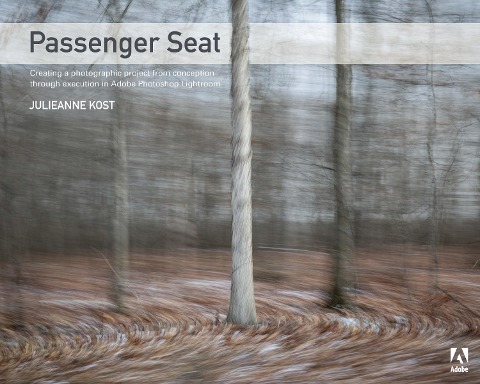
In her long career as Product Evangelist for Adobe Photoshop and Lightroom, Julieanne Kost has taught thousands of digital photographers how to get the most out of Adobe's digital imaging software, in seminars, presentations, and blog posts ranging from nuts-and-bolts tips and tricks to inspirational tutorials on creating sophisticated artistic effects. As Lightroom has grown into the premier image organization and editing tool for photographers, she is often asked by her students and other fans to outline her own Lightroom workflow in a book. This is that book! Using her own stunning images as the starting point, Julieanne shares her working methods with the reader, starting from the initial idea for a photo project, continuing through planning and executing the shoots, and spending the bulk of the time describing the post-capture workflow: organizing the images in Lightroom, performing basic and advanced edits, off-loading images to Photoshop for special purposes, then packaging the project for publication and distribution as a book, slideshow, or web site. Readers will reap the benefit of Julieanne's long and deep experience with both Lightroom and Photoshop as well as her refined artist's sensibility. The book deftly combines practical information about working with the camera and computer, but under Julieanne's guidance the practical is always presented in the service of maintaining and supporting the photographer's vision for the overall project. There are other books on using Lightroom to catalog and edit images, but they tend to be general-purpose manuals that cover any and all types of images and uses. This book focuses on those techniques and workflows that Julieanne finds most useful for her own photographic projects; in this case a series of images shot from the window of a moving car going through a variety of landscapes at different times of the year. Check out the ad in the back of the book for details on becoming an Adobe Creative Cloud Photography plan member for up to 20% off your first year!
Named one of Fast Company's "100 Most Creative People in Business," Julieanne Kost is a Principal Evangelist at Adobe Systems, responsible for fostering relationships with customers through meaningful and inspirational Photoshop and Lightroom instruction. As a highly sought-after speaker for the industry-standard Digital Imaging franchise, she devises and presents motivating and educational training sessions, sharing original techniques and tutorials worldwide - via live events, Adobe.com, her own website (jkost.com) and blog (blogs.adobe.com/jkost). She is also the author of "Window Seat - The Art of Digital Photography and Creative Thinking," an accomplished photographer and fine artist, and creator and host of the popular Photoshop CC Essential Training and the Art of Photoshop Compositing for Lynda.com, as well as "Revitalize your Workflow with Lightroom" for CreativeLive. Kost is well-known for her unique approach to instruction, infusing practical tips and tricks with an equal amount of humor and creativity that keeps audiences entertained and engaged. She often serves as a guest lecturer at distinguished photography schools and leading educational institutions around the world. She has created and published more than a thousand instructional videos for Adobe Photoshop and Lightroom. For her outstanding service and contributions to the photographic industry, she received the Gerhard Bakker award from the Professional Photographers of America and was granted the title of Honorary Educational Associate from the American Society of Photographers.
&> First things first 1. Introduction 2. Personal Projects - A Necessity 3. Defining the project. 4. Equipment 5. Perseverance Shooting 6. Camera Techniques (basic design principals) 7. Capturing Motion (different types) 8. During the Shoot 9. Defining Your Own Personal Project The Photographs AFTER - The post-capture workflow Organizing 10. Customizing Lightroom 11. Adding Images to Lightroom 12. Editing (culling)Images 13. Renaming files 14. Adding Keywords 15. Making Collections 16. Sequencing images (printing contact sheets?) Enhancing 17. Setting up LR default processing 18. Applying Lens corrections 19. Cropping 20. The Histogram 21. Making Basic adjustments 22. Comparing edits (before and after, using VCs) Going deeper 23. Advanced Tonal and Color Adjustments 24. Removing dust and small imperfections 25. Making selective adjustments (Adjustment brush, radial and graduated filters) 26. Sharpening and Noise Reduction 27. Special Effects (vignettes and grain) Going wider 28. Syncing Files 29. Creating and applying Presets 30. Converting to DNG 31. Saving Changes and Exporting from LR 32. Opening Files into Photoshop (for further processing) 33. Making selective changes - dodge and burn, masking 34. Removing imperfections using the Content aware Tools 35. Saving files in Photoshop Going public 36. Making Books in Lightroom (Blurb and PDF) (sequencing images) 37. Sharing your work 38. Making a slideshow in Lightroom 39. Printing the Perfect Image 40. Exporting images for posting online (export and print to JPEG) 41. Archiving your photography